Recently, I got an ESP32 and some other parts for me to finally start doing robotics. Before this, when I went to camp, I really enjoyed learning about robotics and using the ESP32. That’s where the interest really came from, and I finally started my robotics journey by getting quite a few parts. Which, of course, meant I immediately ignored the perfectly sensible advice of starting simple. The first thing I wanted to do was test the display and see if it worked, which, other than the ESP32, is one of the most important pieces of the project that I wanted to make. It made sense to test it first.
In my head, this was going to take maybe ten minutes. That estimate aged very poorly.
I started by connecting the wires between the display and the ESP32, though I kept on getting a white screen, which meant that either my code was wrong or my wiring was wrong. I kept on checking both my wiring and my code, but I found no errors. I kept on changing things in my code, but the issue still persisted. Eventually, I got a small breakthrough. My screen worked, and I got some code to run, but there was a little bit of static on the side. No matter if I changed the resolution or the rotation, the static was still there.
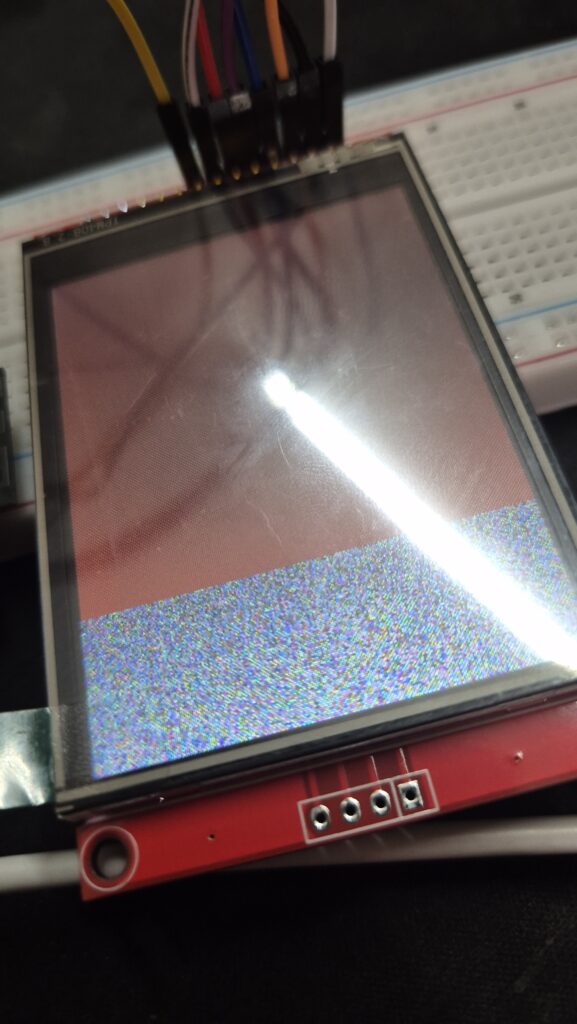
This ended up being the problem that took the longest to solve. I eventually decided that I wouldn’t be able to solve it that day, so I went to bed. The next day, with lots of motivation, I started again, and that motivation slowly turned into frustration as I got the same error. I tried everything I could to fix it. Eventually, I went to the website because there was a slight chance that I was using the wrong library or driver. The issue was that the website itself showed two different drivers, so I was confused. Nothing builds confidence like the official website giving you two different answers. I decided to switch to the other one that I wasn’t using, and that was when I got the major breakthrough. My screen finally worked without the static.
After that, I decided to test some other pieces of code as well. I tried a basic paint app where, using the pen, you draw and can clear the screen as well. Even then, I ran into a small issue. When I started drawing, the touch was working, but it wasn’t drawing where my hand was. Everything was offset. Apparently, my touchscreen had decided that left was right, and right was… also not right. I started debugging again, and it turned out that the rotation I had put in my code was wrong, which meant the touch was inverted. As soon as I changed it, everything started working normally. After a day or two of debugging, I finally got it to work.
This taught me that debugging doesn’t always mean I have to be checking my code on the screen for hours and hours. Sometimes the issue is with the tools or the documentation that you may be following in the first place. It also means to take a good nap in the middle.
And that’s it for this post! See you all next time.
